Skip to documentation

End-to-end walkthroughs

Use case: automated reports

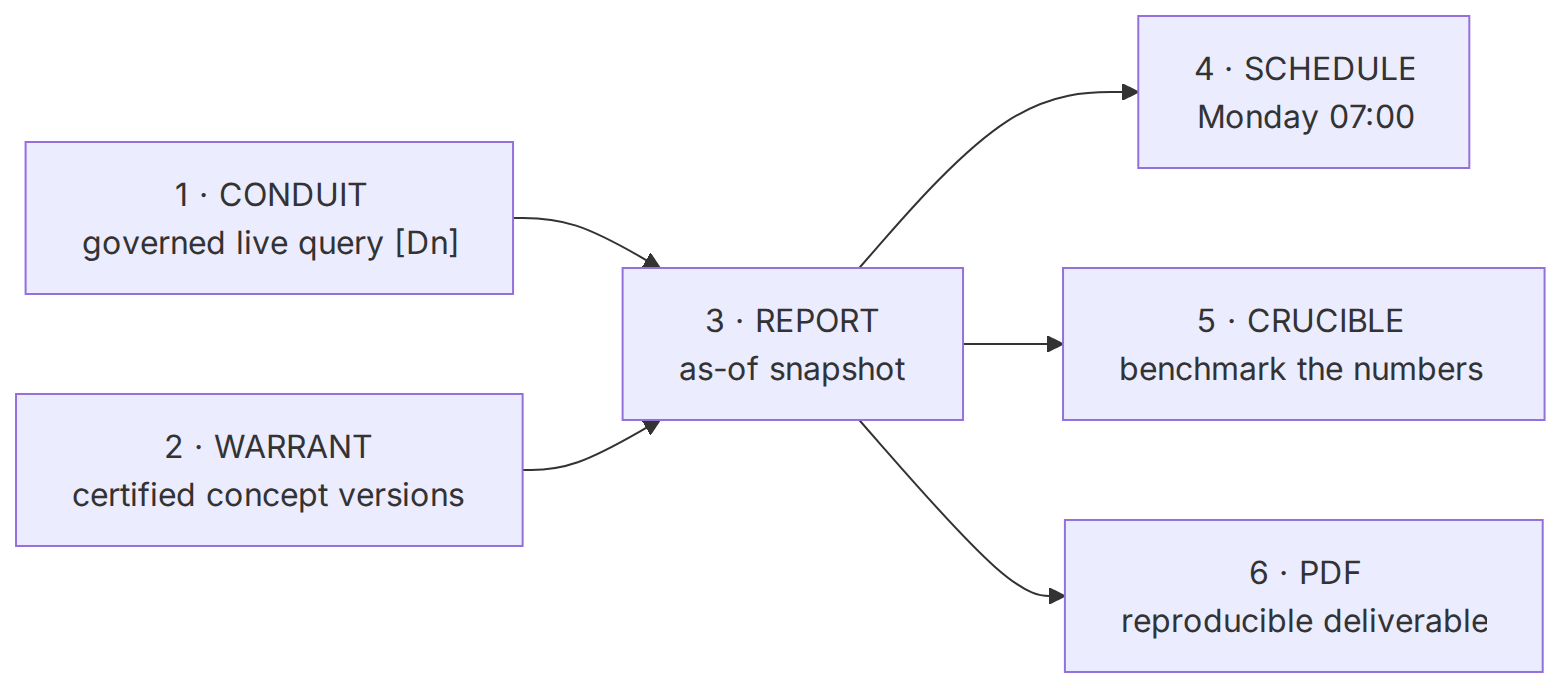
The consulting deliverable is a report a client trusts: current numbers, defensible definitions, and the same thing every Monday without anyone assembling it by hand. This guide builds that pipeline end to end across the module slices: Conduit pulls today's numbers from live data with provenance, Warrant supplies the certified concept definitions those numbers are cited against, report generation freezes them into an as-of snapshot, a schedule renders it, Crucible benchmarks the quality, and the result is a reproducible PDF.

Automated report generation

Live data (Conduit) and certified definitions (Warrant) both feed the as-of snapshot; the snapshot fans out to a schedule, a quality benchmark, and a rendered PDF — each number carrying its provenance.

Rendering diagram

Downloads

Concepts

  • Use case automated reports
  • Guides

Keywords

  • as-of snapshot
  • Monday 07:00
  • benchmark the numbers
  • certified concept versions
  • reproducible deliverable
  • Dn
  • REPORT
  • WARRANT
  • SCHEDULE
  • CRUCIBLE
  • PDF
Source and generation provenance

Status: current

Generated at: 2026-08-12T23:37:05.029Z

Source hash: 5af851dce5bfbbca40cec4f187593c36fcd388c52156c1f7c71057836d7d332b

Metadata payload hash: bd9b579ec7a2106bb28e39b5cd31d13ef3967e2d9ef306428df2fdd8f0886176

Canonical appearance

src/app/(docs)/docs/guides/use-case-automated-reports/page.tsx:29 route /docs/guides/use-case-automated-reports

All appearances

  • canonicalsrc/app/(docs)/docs/guides/use-case-automated-reports/page.tsx:29 route /docs/guides/use-case-automated-reports

No mirrored appearances.

Generation versions

App: eli-ai 0.1.0

Mermaid: 11.16.0 · Mermaid CLI: 11.16.0

Node: v26.3.1 · Yarn: 4.17.1

Renderer config hash: 68c10966fe84406ee626034d58bfabd555df9f65f691204b7c46db24038da101

Renderer theme hash: c80287a78d80ad63d27bd5ca348b2ef9a7e2f44da289e436be6484ea28a1b033

Adapter versions: diagramGenerator=2, drawioFlowchart=1, drawioGantt=1, drawioSequence=1, drawioState=1

Full sidecar JSON: automated-report-generation-5af851dc.json

Prerequisites

  • A workspace key with data:read, data:run, reports:write, reports:read, and runs:read, exported as $ELI_KEY. See Getting started.
  • A configured data connector and at least one named query. See Data connectors & domain components.
  • Some ingested, governed documents — a report over an empty KB is a report about an empty KB.

1 · Conduit — pull today's numbers, with provenance

A report's numbers should be live, not copied from a stale doc. Conduit runs governed named queries— reusable domain components bound onto entities — against live SQL or Snowflake. List what's available, then run one; every execution writes an append-only data_calls row and hands back a dataCallId — the [Dn] anchor you can cite later.

GET/api/v1/data/queriesBearer · data:read

List named queries (domain components) available to run, with their parameter specs.

Example requestbash
curl -s https://eli.ai/api/v1/data/queries \
  -H "Authorization: Bearer $ELI_KEY"
Responsejson
{
  "items": [
    {
      "id": "01KYQRYUSECASEAUTOMATEDREP",
      "connectorId": "01KYCONNUSECASEAUTOMATEDRE",
      "slug": "arr-by-segment",
      "title": "ARR by segment",
      "description": "Live annual recurring revenue grouped by customer segment. Bound to the ARR concept.",
      "params": [
        {
          "name": "as_of",
          "type": "string",
          "required": false,
          "description": "ISO date; defaults to today."
        }
      ]
    }
  ],
  "total": 1
}
POST/api/v1/data/queries/{slug}/runBearer · data:run

Execute a named query with validated params. Read-only, row-capped, timed, and provenance-logged. Params are bound, never interpolated. Returns a dataCallId — the [Dn] provenance anchor.

Example requestbash
curl -s -L -X POST https://eli.ai/api/v1/data/queries/arr-by-segment/run \
  -H "Authorization: Bearer $ELI_KEY" \
  -H "Content-Type: application/json" \
  -d '{"params":{"as_of":"2026-07-21"}}'
Responsejson
{
  "dataCallId": "01KY10CCCCCCCCCCCCCCCCCCCC",
  "connectorId": "01KYCONNUSECASEAUTOMATEDRE",
  "queryId": "01KYQRYUSECASEAUTOMATEDREP",
  "columns": [
    "segment",
    "arr_usd"
  ],
  "rows": [
    {
      "segment": "Enterprise",
      "arr_usd": 4210000
    },
    {
      "segment": "Mid-market",
      "arr_usd": 1880000
    }
  ],
  "rowCount": 2,
  "durationMs": 63,
  "truncated": false
}

2 · Warrant — cite numbers against certified definitions

A number is only defensible if its definitionis. "ARR" means nothing in a client report unless everyone agrees what it counts. That agreement is a certified concept in Warrant — and because concepts are versioned, a report can cite the exact version of the definition in force when it was generated. The arr-by-segment query is bound to the ARR concept; when the report grounds that row, it references the concept at its current certified version. Confirm the definition is pinned before you schedule anything on top of it:

POST/api/v1/entities/{id}/certifyBearer · kb:write

Owner/admin sign-off on the concept definition the report will cite. Bumps the version and starts the review clock, so a scheduled report never quietly cites a definition that drifted.

Example requestbash
curl -s -L -X POST https://eli.ai/api/v1/entities/01KZARRCONCEPT00000000000/certify \
  -H "Authorization: Bearer $ELI_KEY" \
  -H "Content-Type: application/json" \
  -d '{"note":"ARR = normalized annual recurring revenue, excludes one-time services. Signed off by Finance."}'
Responsejson
{ "authority": "certified", "lifecycleStatus": "published", "version": 5, "nextReviewAt": "2027-01-17T09:10:00.000Z" }

Now a claim in the report — "Enterprise ARR is $4.21M [D1] as defined by ARR v5 [S1]" — carries both a [Dn] live-data provenance anchor and an [Sn] citation to the governed definition at a specific version. Fuse both in one grounded call by asking with includeData: true:

POST/api/v1/queryBearer · agents:run

Grounded answer fusing the semantic and data layers: detected entities' bound queries run as governed [Dn] lookups, alongside document [Sn] citations. This is the narrative a report section wraps around the numbers.

Example requestbash
curl -s -L -X POST https://eli.ai/api/v1/query \
  -H "Authorization: Bearer $ELI_KEY" \
  -H "Content-Type: application/json" \
  -d '{"question":"What is Enterprise ARR this quarter and how is ARR defined?","includeData":true}'
Responsejson
{
  "answer": "Enterprise ARR is $4.21M [D1], where ARR is normalized annual recurring revenue excluding one-time services [S1].",
  "claims": [
    { "text": "Enterprise ARR is $4.21M", "citations": ["D1"] },
    { "text": "ARR excludes one-time services", "citations": ["S1"] }
  ],
  "dataCalls": [ { "id": "D1", "dataCallId": "01KY10CCCCCCCCCCCCCCCCCCCC", "queryTitle": "ARR by segment", "executedAt": "2026-07-21T07:00:03.412Z" } ],
  "sources": [ { "id": "S1", "docId": "01KZARRDEF0000000000000000", "docTitle": "Metric definitions", "docPath": "finance/metric-definitions.md" } ],
  "policy": { "decision": "answer", "confidence": "high" }
}

3 · Generate the as-of snapshot

A report freezes the knowledge base as of a moment in time — coverage, KPIs, top entities, gaps, what to interview next — and persists it immutably. The numbers are stamped at generation, so a report you hand a client in July still reads the same in December, and re-rendering it is byte-for-byte identical because the layout version is stamped in.

POST/api/v1/reportsBearer · reports:write

Generate an as-of report snapshot over the current KB. Returns 201 with the finished snapshot — no model call, so the numbers are computed straight from the persisted graph.

Example requestbash
curl -s -L -X POST https://eli.ai/api/v1/reports \
  -H "Authorization: Bearer $ELI_KEY" \
  -H "Content-Type: application/json" \
  -d '{"title":"Acme — weekly revenue & coverage report"}'
Responsejson
{
  "id": "01KY13DDDDDDDDDDDDDDDDDDDD",
  "title": "Acme — weekly revenue & coverage report",
  "kind": "engagement",
  "status": "ready",
  "layoutVersion": 4,
  "createdBy": "01KY12CCCCCCCCCCCCCCCCCCCC",
  "generatedAt": "2026-07-21T12:00:00.000Z",
  "coverage": {
    "matrix": {
      "businessUnits": [
        "Operations"
      ],
      "topics": [
        "Compliance"
      ],
      "cells": [
        {
          "businessUnit": "Operations",
          "topic": "Compliance",
          "docCount": 8,
          "entityCount": 12,
          "medianAgeDays": 14,
          "zeroCoverage": false
        }
      ]
    },
    "summary": {
      "docs": 214,
      "entities": 182,
      "orphanEntities": 11,
      "stalenessMedianDays": 23,
      "totalInterviews": 18,
      "interviewsByBu": [
        {
          "businessUnit": "Operations",
          "count": 7,
          "lastInterviewAt": "2026-07-15T15:30:00.000Z"
        }
      ],
      "businessUnitCount": 1,
      "topicCount": 1,
      "generatedAt": "2026-07-21T12:00:00.000Z"
    },
    "interviewNext": [
      {
        "businessUnit": "Operations",
        "topic": "Compliance",
        "docCount": 8,
        "medianAgeDays": 14,
        "interviews": 7,
        "reasons": [
          "lowest document coverage"
        ],
        "label": "Operations · Compliance"
      }
    ]
  },
  "summary": {
    "kpis": {
      "docs": 214,
      "entities": 182,
      "relations": 388,
      "orphanEntities": 11,
      "stalenessMedianDays": 23,
      "totalInterviews": 18,
      "businessUnitCount": 1,
      "topicCount": 1,
      "coveredCells": 1,
      "zeroCoverageCells": 0,
      "coveragePct": 100
    },
    "topEntities": [
      {
        "entityId": "01KY0ZW3AAAAAAAAAAAAAAAAAA",
        "name": "Order Platform",
        "type": "system",
        "pagerank": 0.0421,
        "degree": 17,
        "communityId": 2
      }
    ],
    "gaps": {
      "total": 0,
      "items": []
    },
    "generatedAt": "2026-07-21T12:00:00.000Z",
    "layoutVersion": 4
  },
  "graphImage": "data:image/svg+xml;base64,PHN2ZyB4bWxucz0iLi4u"
}

4 · Schedule it

Automation is the point. Put the generation call on a schedule and the Monday-morning report is rendered before anyone opens their inbox. The cron substrate — recurring jobs, drift checks, and alerting on the same durable queue that runs syncs — is covered in Scheduling, drift & alerts. A scheduled run does exactly what the manual POST /api/v1/reportsabove does, on a cadence, under the same key and scopes. Because Conduit re-runs the bound queries at generation time, each weekly snapshot captures that week's live numbers — while the certified definitions they cite stay pinned until Warrant deliberately bumps them.

Every re-download is identical

Rendering is serialized on a concurrency-1 headless-Chromium queue, so a burst of scheduled reports queues rather than exhausting the box. The structured data is available the instant generation finishes — you never wait on the PDF to consume the numbers — and every re-render of an old snapshot is byte-for-byte the same because its layout version is stamped in.

5 · Crucible — benchmark the report's quality

A report a client relies on has to be right, and "right" must be measurable. The narrative sections are grounded answers, so the same evaluation framework that scores chat scores the report: build a golden set of the questions each section answers — "What is Enterprise ARR?", "Which segment grew fastest?" — and read faithfulness and abstention on a run. A regression here means a section would ship a wrong number; you catch it before the client does.

GET/api/v1/evals/runs/{id}/metricsBearer · kb:read or runs:read

Retrieval, RAGAS, and abstention metrics for one run. Faithfulness is the report's ruler: are the stated numbers actually grounded in the cited data and definitions?

Example requestbash
curl -s https://eli.ai/api/v1/evals/runs/01KZRUNA00000000000000000/metrics \
  -H "Authorization: Bearer $ELI_KEY"
Responsejson
{
  "runId": "01KZRUNA00000000000000000",
  "status": "succeeded",
  "samplesN": 3,
  "resultsCounted": 42,
  "retrieval": {
    "recallAtK": 0.74,
    "precisionAtK": 0.44,
    "ndcgAt10": 0.71,
    "mrr": 0.79,
    "hitAtK": 0.93
  },
  "ragas": {
    "faithfulness": 0.91,
    "responseRelevancy": 0.84,
    "contextPrecision": 0.66,
    "contextRecall": 0.72,
    "noiseSensitivity": 0.08
  },
  "abstention": {
    "total": 42,
    "abstained": 5,
    "answered": 37,
    "abstentionRate": 0.119,
    "meanTruthfulness": 0.62,
    "aurc": 0.074,
    "riskCoverage": [
      {
        "threshold": 0.91,
        "coverage": 0.5,
        "risk": 0.048
      },
      {
        "threshold": 0.62,
        "coverage": 1,
        "risk": 0.143
      }
    ]
  },
  "errorClasses": {
    "correct": 31,
    "retrieval_miss": 4,
    "incomplete": 3,
    "citation_error": 2,
    "hallucination": 2
  },
  "quality": {
    "accuracy": 0.81,
    "groundedness": 0.9,
    "citationPrecision": 0.88,
    "citationRecall": 0.84,
    "retrievalHitRate": 0.93,
    "nItems": 42
  }
}

Gate the schedule on it: a nightly benchmark run that dips below your faithfulness floor is an alert, not a silent bad report. Compare a prompt or retrieval change behind a two-gate significance test in Measure & compare before it touches a client-facing deliverable.

6 · Fetch the deliverable

Fetch the snapshot by id and you have the whole deliverable as data — the coverage matrix, the narrative summary, and the graph figure — ready to attach to an email, post to Slack, or feed into your own template:

GET/api/v1/reports/{id}Bearer · reports:read

Fetch the snapshot: stamped metadata plus the computed coverage matrix, narrative summary, and graph figure. Workspace and filesystem fields are stripped.

Example requestbash
curl -s https://eli.ai/api/v1/reports/01KY13DDDDDDDDDDDDDDDDDDDD \
  -H "Authorization: Bearer $ELI_KEY" | jq '{title, status, generatedAt}'
Responsejson
{
  "id": "01KY13DDDDDDDDDDDDDDDDDDDD",
  "title": "Northwind — Q3 engagement report",
  "kind": "engagement",
  "status": "ready",
  "layoutVersion": 4,
  "createdBy": "01KY12CCCCCCCCCCCCCCCCCCCC",
  "generatedAt": "2026-07-21T12:00:00.000Z",
  "coverage": {
    "matrix": {
      "businessUnits": [
        "Operations"
      ],
      "topics": [
        "Compliance"
      ],
      "cells": [
        {
          "businessUnit": "Operations",
          "topic": "Compliance",
          "docCount": 8,
          "entityCount": 12,
          "medianAgeDays": 14,
          "zeroCoverage": false
        }
      ]
    },
    "summary": {
      "docs": 214,
      "entities": 182,
      "orphanEntities": 11,
      "stalenessMedianDays": 23,
      "totalInterviews": 18,
      "interviewsByBu": [
        {
          "businessUnit": "Operations",
          "count": 7,
          "lastInterviewAt": "2026-07-15T15:30:00.000Z"
        }
      ],
      "businessUnitCount": 1,
      "topicCount": 1,
      "generatedAt": "2026-07-21T12:00:00.000Z"
    },
    "interviewNext": [
      {
        "businessUnit": "Operations",
        "topic": "Compliance",
        "docCount": 8,
        "medianAgeDays": 14,
        "interviews": 7,
        "reasons": [
          "lowest document coverage"
        ],
        "label": "Operations · Compliance"
      }
    ]
  },
  "summary": {
    "kpis": {
      "docs": 214,
      "entities": 182,
      "relations": 388,
      "orphanEntities": 11,
      "stalenessMedianDays": 23,
      "totalInterviews": 18,
      "businessUnitCount": 1,
      "topicCount": 1,
      "coveredCells": 1,
      "zeroCoverageCells": 0,
      "coveragePct": 100
    },
    "topEntities": [
      {
        "entityId": "01KY0ZW3AAAAAAAAAAAAAAAAAA",
        "name": "Order Platform",
        "type": "system",
        "pagerank": 0.0421,
        "degree": 17,
        "communityId": 2
      }
    ],
    "gaps": {
      "total": 0,
      "items": []
    },
    "generatedAt": "2026-07-21T12:00:00.000Z",
    "layoutVersion": 4
  },
  "graphImage": "data:image/svg+xml;base64,PHN2ZyB4bWxucz0iLi4u"
}

The PDF is a session download

The rendered PDF is not part of the /api/v1 surface. It is downloaded from the workspace UI, backed by GET /api/w/{workspaceId}/report/{id}/pdf under a session — any member can download, owner/admin can trigger a render with ?render=1. For an automated pipeline the JSON above is the better input anyway: it is diffable, and it does not wait on Chromium.

The leverage

One schedule turns the live state of an engagement into a frozen, reproducible, benchmarked deliverable — with every number carrying its [Dn] query provenance and every definition its [Sn] concept version. Conduit keeps the numbers current, Warrant keeps the definitions defensible, Crucible keeps the quality measured, and the PDF is the artifact the client pays for. Nobody assembled it by hand, and anyone can trace any figure back to the exact query and definition behind it.

Related

The full report mechanics live in Build reports and Reports & PDF deliverables; the other end-to-end walkthrough is Sales enablement. See the whole platform in the Capability map.