Intake
Bulk import & onboarding
The fastest path from "empty workspace" to "grounded answers" is getting your existing material in. eli.ai supports multi-file bulk import that fans every document into the same ingestion pipeline a single save uses, and a guided first-run welcome flow that walks a new workspace through import, extraction, and its first question.
Multi-file import
Import onboarding pipeline
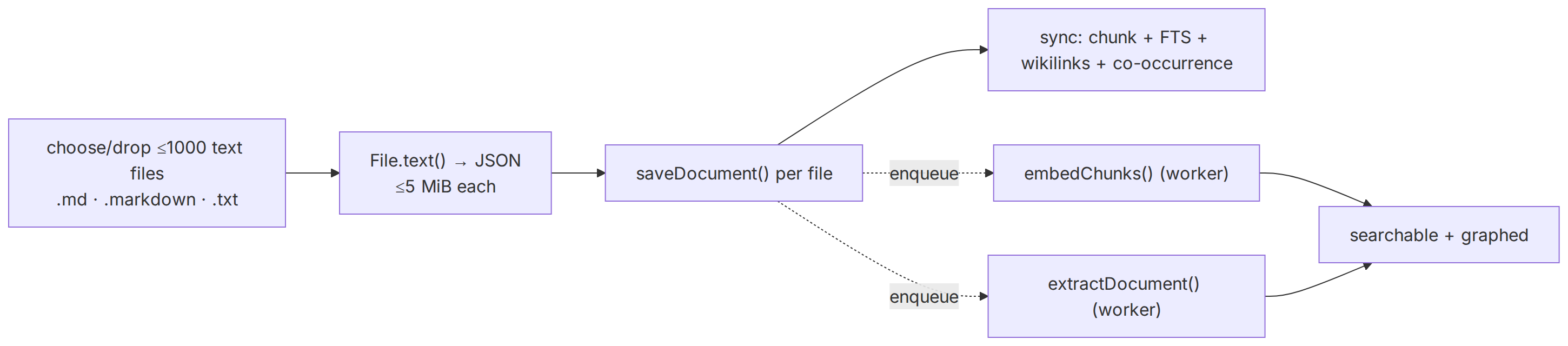
Each imported file flows through the standard ingestion pipeline.
Downloads

Concepts
- Import onboarding
- Capabilities
- Import
Keywords
- .md · .markdown · .txt
- File.text() → JSON
- ≤1000 text files
- ≤5 MiB each
- saveDocument() per file
- embedChunks() (worker)
- searchable + graphed
- sync: chunk + FTS + wikilinks + co-occurrence
- extractDocument() (worker)
- choose/drop
Source and generation provenance
Status: current
Generated at: 2026-08-12T23:39:22.646Z
Source hash: daa9e5adc6f90fa2343d5f7393271de381af1c623b32b435c7e11c965e8a7fa3
Metadata payload hash: 81f48408593b80e758f680f4c6a2e8625734244f1141caf6e4916af0ac4cf6f4
Canonical appearance
src/app/(docs)/docs/capabilities/import-onboarding/page.tsx:30 route /docs/capabilities/import-onboarding
All appearances
canonical—src/app/(docs)/docs/capabilities/import-onboarding/page.tsx:30route/docs/capabilities/import-onboarding
No mirrored appearances.
Generation versions
App: eli-ai 0.1.0
Mermaid: 11.16.0 · Mermaid CLI: 11.16.0
Node: v26.3.1 · Yarn: 4.17.1
Renderer config hash: 68c10966fe84406ee626034d58bfabd555df9f65f691204b7c46db24038da101
Renderer theme hash: c80287a78d80ad63d27bd5ca348b2ef9a7e2f44da289e436be6484ea28a1b033
Adapter versions: diagramGenerator=2, drawioFlowchart=1, drawioGantt=1, drawioSequence=1, drawioState=1
Full sidecar JSON: import-onboarding-pipeline-daa9e5ad.json
Choose or drop up to 1,000 .md, .markdown, or .txt files (5 MiB UTF-8 maximum each). The browser reads them with File.text() and posts JSON; each becomes a document through saveDocument() — the exact entry point the editor uses — so import is never a second-class path. The synchronous phase (chunking, Postgres FTS, wikilink resolution, deterministic co-occurrence edges) runs on save; the expensive phases (embeddings, LLM extraction) are enqueued to the worker, so a large import returns quickly and the graph fills in progressively.
- Per-file isolation.One malformed file fails on its own row; the rest of the batch still imports. Each file's status is reported back individually.
- Progressive readiness. Documents are searchable via FTS the moment they save; vector recall and the typed graph light up as the worker drains the queue.
- Same guardrails. Imported content counts against workspace limits and flows through the same tenancy and provenance rules — nothing about bulk import bypasses row-level security.
Binary files use their own endpoint
POST /api/w/{id}/import/binary (multipart, 25 MB cap): the installed extractors (unpdf, mammoth, officeparser, turndown) convert the blob to markdown on the same normalization path connectors use, then it flows through importMany like any text import. A corrupt or unsupported file is refused with a named extraction failed reason — never silently decoded. ZIP expansion and attachment shadow chunks remain out of scope.Review extracted identities
First-run get-started
After sign-up (or any signed-in visit to /open with zero workspaces), eli.ai sends you to /get-started: name your personal workspace, optionally multi-select industry demo packs (each seeded as its own workspace with full docs), then continue — into the first selected demo, or into personal /welcome if you skipped demos.
The guided welcome flow
A brand-new personal workspace is not empty and inert — the welcome checklist gives it a spine. It orients a new user around the loop that makes eli.ai useful and hands off to the right surface at each step.
Bring in material
The welcome screen leads straight to bulk import (or the editor for a first note), so the workspace has content to reason over within minutes.Watch the graph build
As extraction runs, the flow points at the entity graph forming — entities, relations, and provenance — so the value of ingestion is visible, not abstract.Tune the ontology (optional)
If the domain needs its own vocabulary, the flow links to ontology authoring before extraction has processed everything, so new types apply broadly.Ask the first grounded question
Finally it drops the user into chat with a suggested question, producing an answer with clickable[Sn]citations — the payoff that closes the onboarding loop.
Beneath the checklist, a capability tour walks the eight platform systems one at a time — name, what it does, and live links into every surface it owns — driven by the same registry the sidebar navigation uses, so the tour can never drift from the product. Progress resumes where you stopped, and the whole welcome page stays reachable afterward via Getting started in the sidebar.
Seeded, not blank
Related
- Knowledge base & vault — where imported documents live.
- Entity graph — what extraction builds from an import.