Module references
Module reference / Query it
Conduit
- Atlas
Bind named queries to the entities and types they describe.
- Warrant
Apply caller entitlements before any live row is returned.
- Lens
Contribute live Data Citations to grounded answers.
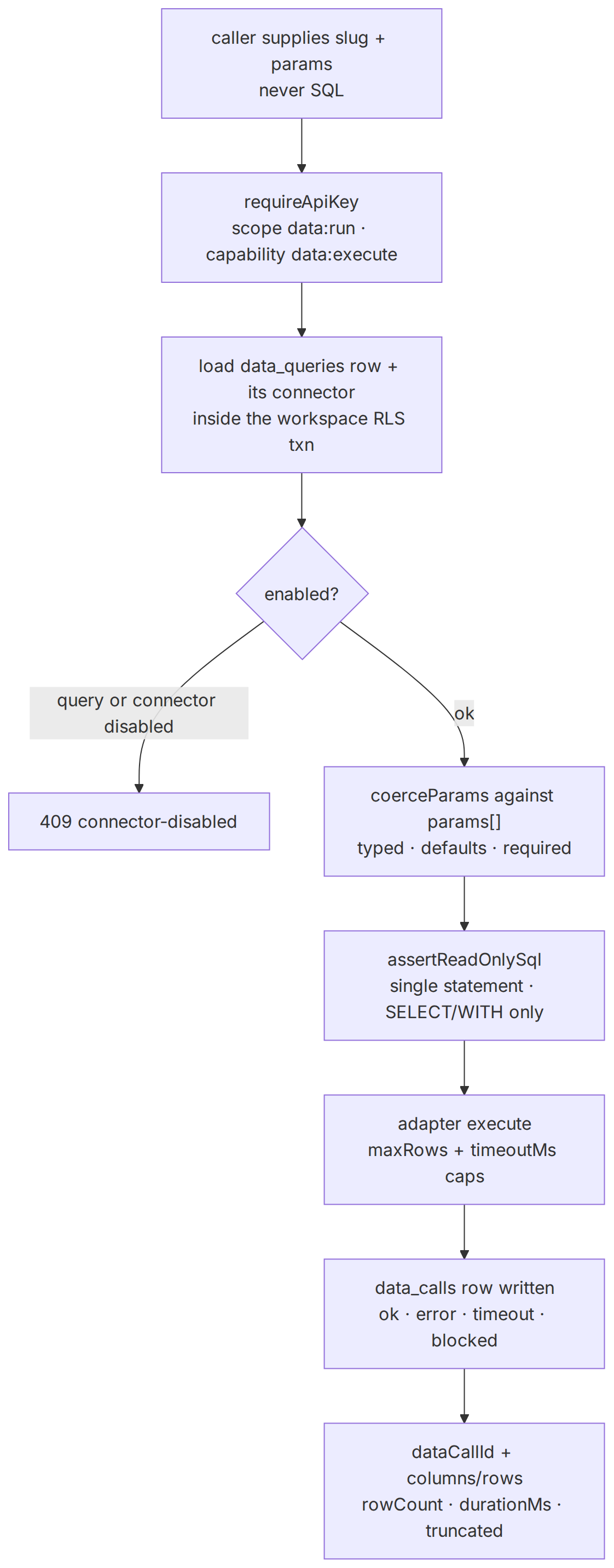
Conduit is the data module — capability area data, labelled Conduit (data) in the capability catalog. A workspace registers scoped, read-only connectors (PostgreSQL, MySQL, Snowflake) and a set of named queries: human-authored, single-statement SQL templates with typed parameters. Callers pick a query by slug and supply parameter values; they never supply SQL.
Every execution is checked against a read-only statement policy, capped by the connector's maxRows and timeoutMs, and recorded as an append-only data_calls row. The id of that row comes back as dataCallId — the anchor a [Dn] citation points at. Separately, a query can be bound to a graph entity or entity type, which is what lets other modules resolve "the current numbers for this thing" without anyone writing SQL at answer time.
Conduit — execution
One governed execution. The statement gate, the row/time caps, and the provenance write are not optional and not caller-configurable — they live in the executor, below the route.
Downloads

Concepts
- Modules
- Conduit
- Execution
Keywords
- never SQL
- inside the workspace RLS txn
- data_calls row written
- load data_queries row + its connector
- single statement · only
- adapter execute
- caller supplies slug + params
- scope data:run · capability data:execute
- query or connector disabled
- maxRows + timeoutMs caps
- ok · error · timeout · blocked
- rowCount · durationMs · truncated
- columns/rows
- requireApiKey
- enabled?
- ok
- assertReadOnlySql
- dataCallId
Source and generation provenance
Status: current
Generated at: 2026-08-17T18:31:51.352Z
Source hash: 518cdca80633c1a24612ea8b15c518aa40eee0bdb82db7666f45709cb72f0bde
Metadata payload hash: 5f48aeaea00271074e54d05e21662cd8e98a2f10cce068559a83938bd54bae38
Canonical appearance
src/app/(docs)/docs/modules/conduit/page.tsx:46 route /docs/modules/conduit
All appearances
canonical—src/app/(docs)/docs/modules/conduit/page.tsx:46route/docs/modules/conduit
No mirrored appearances.
Generation versions
App: eli-ai 0.1.0
Mermaid: 11.16.0 · Mermaid CLI: 11.16.0
Node: v26.3.1 · Yarn: 4.17.1
Renderer config hash: 68c10966fe84406ee626034d58bfabd555df9f65f691204b7c46db24038da101
Renderer theme hash: c80287a78d80ad63d27bd5ca348b2ef9a7e2f44da289e436be6484ea28a1b033
Adapter versions: diagramGenerator=2, drawioFlowchart=1, drawioGantt=1, drawioSequence=1, drawioState=1
Full sidecar JSON: conduit-execution-518cdca8.json
Use it standalone
Conduit's public surface is three HTTP operations and one React component. Adopting it needs no documents, no knowledge graph, no embeddings, and no chat model.
Issue a key with the data scopes
data:readlists connectors and named queries.data:runexecutes one. They are independent — a read-only integration never needsdata:run. On a delegated user key (eli_uk_) the owner must additionally still hold the matching capability:data:readfor the reads,data:executefor the run. Workspace keys (eli_sk_) are scope-gated only.Install and import one entry point
Headless:
@eli-ai/client/data. React:@eli-ai/react/dataplus@eli-ai/react/provider. Neither pulls in the aggregate client, the query types, or any other module's contracts.Run a query by slug
Parameters are a flat object keyed by declared parameter name. Unknown keys are ignored and never reach SQL.
What this does NOT require
kb:read / kb:write scope, no ingested documents, no entities or ontology, no agent definition or run, no embedding model, and no chat model. The run endpoint performs zero LLM calls — it is SQL execution behind a policy gate. Entity bindings are the one Conduit feature that genuinely needs another module; see how it composes.Reading queries reveals their SQL
GET /api/v1/data/queries returns each query's full sqlTemplate. Treat data:read as "may read the SQL of every named query in the workspace," not merely "may see a list of titles." Connector credentials are never returned by any route — the ciphertext column is stripped and replaced with the boolean hasCredential.React components
@eli-ai/react/data exports exactly one component, EliLiveData, plus its two label/prop types (EliLiveDataProps, EliLiveDataLabels). There is no separate connector-management or binding-editor component in the package.
EliLiveData
A single surface that loads the workspace's connectors and named queries on mount, renders the connectors as badges (the package's positive tone when enabled, neutral otherwise), and renders a form with a query select, a JSON textarea for parameters, and a submit button. Options for disabled queries render but are non-selectable, and each option is labelled title (falling back to slug) followed by its connector name when that connector is in the list. On success it renders a results table with the returned columns as headers, plus badges for rowCount, durationMs, and a "Truncated" badge when the row cap was hit. Cells that are objects or arrays are JSON-stringified; null and undefined render as an em dash.
The component issues one data:read call per list on mount and one data:run call per submit. The parameter textarea starts at {} and must parse to a JSON object: invalid JSON reports "Parameters are not valid JSON." and a JSON array or null reports "Parameters must be a JSON object." — both inline, before any request is made.
EliLiveData props
Do not ship a workspace key to the browser
EliProvider accepts a transport (or an aggregate client whose transport it retains) and never a credential. Give it a fetch that calls your own same-origin endpoint, and attach the eli_sk_ key there. A data:run key in a bundle is a direct execute grant against production databases.HTTP API
Three operations, all under /api/v1/data. Failures use the shared envelope { "error", "message" }; a body that fails validation adds an issues array. Because the apex 308-redirects, pass -L on the non-GET call so curl replays the POST body.
/api/v1/data/connectorsscope data:read · capability data:readEvery data connector in the workspace, ordered by name, credential-masked. Read-only — no connection is opened and nothing is executed.
config is the non-secret connection shape for that kind: Postgres and MySQL carry host · port · database · user (plus sslMode or ssl); Snowflake carries account · database · warehouse · user (plus optional schema and role). schemaSnapshot, when present, holds the discovered tables with their columns (name · dataType · nullable) and a nullable rowEstimate.
/api/v1/data/queriesscope data:read · capability data:readThe workspace's governed named queries, ordered by slug, optionally narrowed to one connector. Nothing is executed here.
Query parameters
Each entry in params declares name, a type of string | number | boolean | date, and optionally required, default, and description. Order is meaningful: the executor binds params[0] to $1, and so on.
/api/v1/data/queries/{slug}/runBearer · data:runExecute one governed named query. The path segment accepts the query's slug or its id. Read-only SQL, row and timeout caps, and a data_calls provenance row are enforced by the executor, below the route.
Request body
truncated is true when the connector's maxRows cap clipped the result — the rows you received are a prefix, not the whole answer. Data-layer failures map their code to a status:
- 404
query-not-found— no query with that slug or id;connector-not-found— the query's connector row is gone. - 409
connector-disabled— emitted when either the query or its connector hasenabled: false. Themessagenames which one. - 400
invalid-params— a missing required param or a value that will not coerce to its declared type;not-read-only— the stored template failed the statement gate. - 502
execution-failedand 504timeout— the external engine errored or exceededtimeoutMs. - 401
unauthorized; 403insufficient_scopeorinsufficient_capability; 400invalid_json/invalid_bodyfrom the shared gate.
Authoring is not part of the v1 key surface
/api/v1 route that creates, edits, or deletes a connector, a named query, or an entity binding, and none that lists bindings. Those are session-authenticated workspace operations under /api/w/…, gated on the data:write capability and owner/admin. An API key can read the catalog and execute a query — nothing more.Read-only is enforced statically, not by trusting the author
SELECT or WITH, with no INSERT, UPDATE, DELETE, INTO, DDL, or session keywords anywhere in it — which is what rejects a writing CTE and SELECT … INTO. Connectors also expose an allowRawSql opt-in for exploratory SQL through other surfaces; it is off by default and is not reachable through the three routes above.Data elements
Four tables. All four are workspace-scoped and carry a row-level-security policy keyed on workspace_id for every operation, so a query outside the workspace transaction context returns nothing — the API's scope check and RLS are two independent gates.
| Table | Conduit | Columns that matter to a consumer | What one row means |
|---|---|---|---|
| data_connectors | owns · RLS | id · workspace_id · name · kind · config · credential_enc · max_rows · timeout_ms · allow_raw_sql · enabled · schema_snapshot · last_status | One scoped external source. credential_enc is AES-256-GCM at rest, decrypted only inside the executor at call time, and never leaves the server — the API returns hasCredential instead. max_rows/timeout_ms are the caps applied to every call. Unique on (workspace_id, name). |
| data_queries | owns · RLS | id · workspace_id · connector_id · slug · title · description · sql_template · params · enabled | One named query. sql_template uses positional $1..$n placeholders only; params is the typed spec array those placeholders bind to, in order. description is written for a model to read. Unique on (workspace_id, slug). |
| entity_bindings | owns · RLS · not on /api/v1 | id · workspace_id · entity_id · entity_type · query_id · label · param_map · enabled | Attaches a named query to one entity or to a whole entity type — exactly one of entity_id / entity_type is set. param_map says where each query param comes from: entity_name, a const value, or model (supplied at call time). Read and written by other modules; no v1 route exposes it. |
| data_calls | writes · RLS · append-only | id · workspace_id · connector_id · query_id · binding_id · run_id · conversation_id · sql_text · params_used · row_count · duration_ms · status · error · executed_by · executed_at | One execution attempt. status is ok | error | timeout | blocked — failures and policy rejections are recorded too, not just successes. sql_text is the exact statement executed. The id is the dataCallId returned by the run endpoint and the target of a [Dn] citation. |
Provenance is written even when the call fails
data_calls row with the corresponding status. That means the audit trail answers "what did we try to ask, and what happened" — not only "what succeeded." The row is append-only; there is no update path.Feature map
Everything the surfaces above expose reduces to six feature areas. Each area names the concrete components that deliver it — the same components the code map and the invariants below locate in the repository — and the surfaces where a consumer meets it.
| Feature area | What it provides | Delivered by | Surfaces |
|---|---|---|---|
| Connector registry | Scoped, credential-masked registrations of external engines with per-connector row and timeout caps and an optional discovered schema snapshot. | Connector catalog service, engine adapters, the data_connectors table. | REST list endpoint, EliLiveData badges, SDK data client. |
| Named queries with typed params | Human-authored single-statement SQL templates with a positional, typed parameter spec; callers supply values, never SQL. | Query catalog service, executor parameter coercion, the data_queries table. | REST list + run endpoints, EliLiveData form, SDK data client. |
| Read-only execution policy | A static single-statement SELECT/WITH gate, a row-cap subselect wrapper, and per-engine statement timeouts on every call. | Governed executor, engine adapters (postgres, mysql, snowflake). | Every execution path: REST run, MCP tools, structured answers, agent tools. |
| Entity bindings | Attach a query to one entity or a whole entity type with a param map, so "the current numbers for this thing" resolves without anyone writing SQL at answer time. | Entity-binding resolver, structured-query data bridge, the entity_bindings table. | MCP kb_data_discover / kb_data_lookup, includeData answers, workspace app. |
| Per-user entitlements | Fail-closed grants that pin an entitlement-scoped query's parameter to values the calling user actually holds. | Entitlement gate inside the executor, the data_entitlements table. | Enforced on every execution that carries a user principal. |
| Provenance and [Dn] citations | An append-only record of every attempt — including failures and policy rejections — plus a bounded frozen result snapshot and a full-set hash on success. | Provenance recorder in the executor, the data_calls table. | dataCallId on the run response, dataCalls on structured answers, lineage trails. |
System architecture
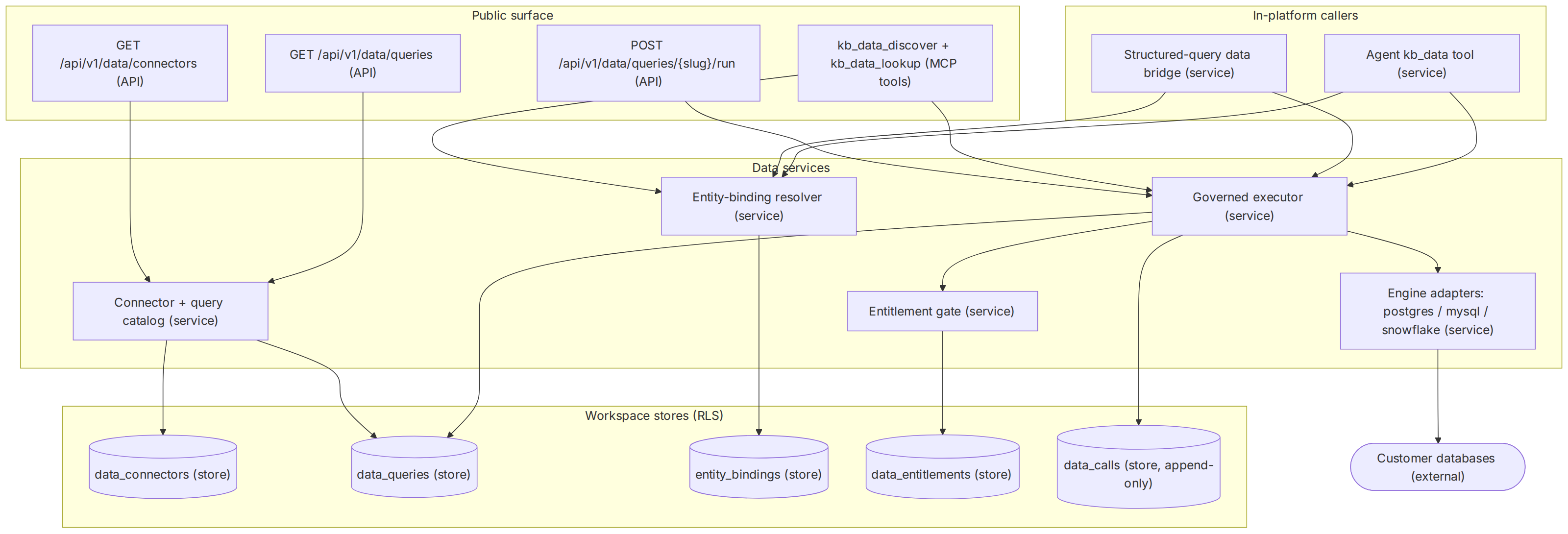
The module is one executor with several front doors. Reads hit the catalog; every execution — REST, MCP, structured answer, or agent tool — converges on the same governed executor, which is the only component that talks to an external engine and the only one that writes provenance.
Conduit — system architecture
Rectangles are API routes and server services, cylinders are workspace tables under row-level security, and the stadium is the customer's external database. Every execution edge passes through the governed executor; no surface reaches an engine adapter directly.
Downloads

Concepts
- System architecture
- Public surface
- In-platform callers
- Data services
- Modules
- Conduit
Keywords
- kb_data_discover + kb_data_lookup (MCP tools)
- GET (API)
- POST {slug}/run (API)
- Agent kb_data tool (service)
- store, append-only
- Structured-query data bridge (service)
- Connector + query catalog (service)
- Entity-binding resolver (service)
- Governed executor (service)
- Entitlement gate (service)
- Customer databases (external)
- Engine adapters: postgres / mysql / snowflake (service)
- /api/v1/data/connectors
- /api/v1/data/queries
- slug
- store
Source and generation provenance
Status: current
Generated at: 2026-08-17T18:31:58.016Z
Source hash: c5ad3b8428ed5aba3e7fa7b2763a103430daabf3fe273d80bd638c9d39c17296
Metadata payload hash: 2f724fe77694b24ec2933008b7d2457b4171cf1162f4bac79e79183a5f258f5f
Canonical appearance
src/app/(docs)/docs/modules/conduit/page.tsx:57 route /docs/modules/conduit
All appearances
canonical—src/app/(docs)/docs/modules/conduit/page.tsx:57route/docs/modules/conduit
No mirrored appearances.
Generation versions
App: eli-ai 0.1.0
Mermaid: 11.16.0 · Mermaid CLI: 11.16.0
Node: v26.3.1 · Yarn: 4.17.1
Renderer config hash: 68c10966fe84406ee626034d58bfabd555df9f65f691204b7c46db24038da101
Renderer theme hash: c80287a78d80ad63d27bd5ca348b2ef9a7e2f44da289e436be6484ea28a1b033
Adapter versions: diagramGenerator=2, drawioFlowchart=1, drawioGantt=1, drawioSequence=1, drawioState=1
Full sidecar JSON: conduit-system-architecture-c5ad3b84.json
How to read the Conduit architecture
- Start at the public surface: Two list routes read the catalog; the run route and the two MCP data tools are the execution entry points, each gated by the data scopes.
- Follow every execution into one executor: The data bridge, the agent tool, MCP, and REST all call the same governed executor — one implementation of the read-only gate, the caps, and the provenance write.
- See where bindings join the graph: The binding resolver maps an entity (or its type) to a named query and a param map; it is the only component that reads entity_bindings.
- End at the two kinds of state: Catalog tables describe what may run; data_calls records what did run — including what was refused.
- Trust boundary
- The executor is the boundary: credentials decrypt only inside it at call time, the read-only statement gate and entitlement gate run before any adapter, and no caller-supplied SQL crosses into an engine.
- Durable state
- data_connectors, data_queries, entity_bindings, and data_entitlements define the governed surface; data_calls is the append-only execution history behind every [Dn] handle.
Failure paths
- Statement fails the read-only gate and is recorded as blocked
- Missing entitlement grant denies an entitlement-scoped query
- External engine timeout maps to a 504 with a timeout row
- Disabled query or connector returns 409 before any I/O
Signals
- data_calls status mix (ok / error / timeout / blocked)
- Truncation rate against connector row caps
- Per-connector execution latency (duration_ms)
- Blocked-row spikes as a policy or injection signal
Where the logic lives
The code map below locates each component from the feature map. Table names appear in the notes; they are all defined in the schema module and carry a workspace row-level-security policy.
| Component | Kind | Lives at | Notes |
|---|---|---|---|
| Data routes | API | src/app/api/v1/data | The listDataConnectors, listDataQueries, and runDataQuery handlers; each guards its scope and maps DataLayerError codes to HTTP statuses. |
| Governed executor | service | src/server/data/executor.ts | assertReadOnlySql, coerceParams, the entitlement gate, executeNamedQuery, and the append-only provenance write into data_calls. |
| Engine adapters | service | src/server/data/adapters | One adapter per engine kind plus the shared row-limit wrapper and timeout mapping; the only modules that import database driver SDKs. |
| Connector + query catalog | service | src/server/data/connectors.ts | Catalog CRUD; credentials encrypt on write and every read returns hasCredential instead of ciphertext; templates are policy-checked at save time. |
| Entity-binding resolver | service | src/server/data/bindings.ts | resolveBindingsForEntity merges direct and type-inherited bindings from entity_bindings; buildParams materializes the param map. |
| Entitlement grants | service | src/server/data/entitlements.ts | Grant administration over data_entitlements; enforcement itself happens inside the executor so no execution path can skip it. |
| Structured-query data bridge | service | src/server/query/data-bridge.ts | Executes the bindings of detected entities for includeData answers and enriches each [Dn] with connector name and executed-at from data_calls. |
| MCP data tools | API | src/server/mcp/server.ts | Registers kb_data_discover and kb_data_lookup; each tool re-checks the same data scopes as the REST routes. |
| Table definitions | store | src/server/db/schema.ts | data_connectors, data_queries, entity_bindings, data_entitlements, and data_calls — all workspace-scoped with tenant RLS policies. |
| Live-data surface | UI | packages/react/src/data/index.tsx | EliLiveData — the one React component this module ships. |
| Headless client | SDK | packages/client/src/data.ts | createDataClient with listConnectors, listQueries, and runQuery. |
| Wire contracts | SDK | packages/contracts/src/data.ts | DataRunResult and the connector, query, and param-spec shapes shared by client and server. |
Primary runtime flow
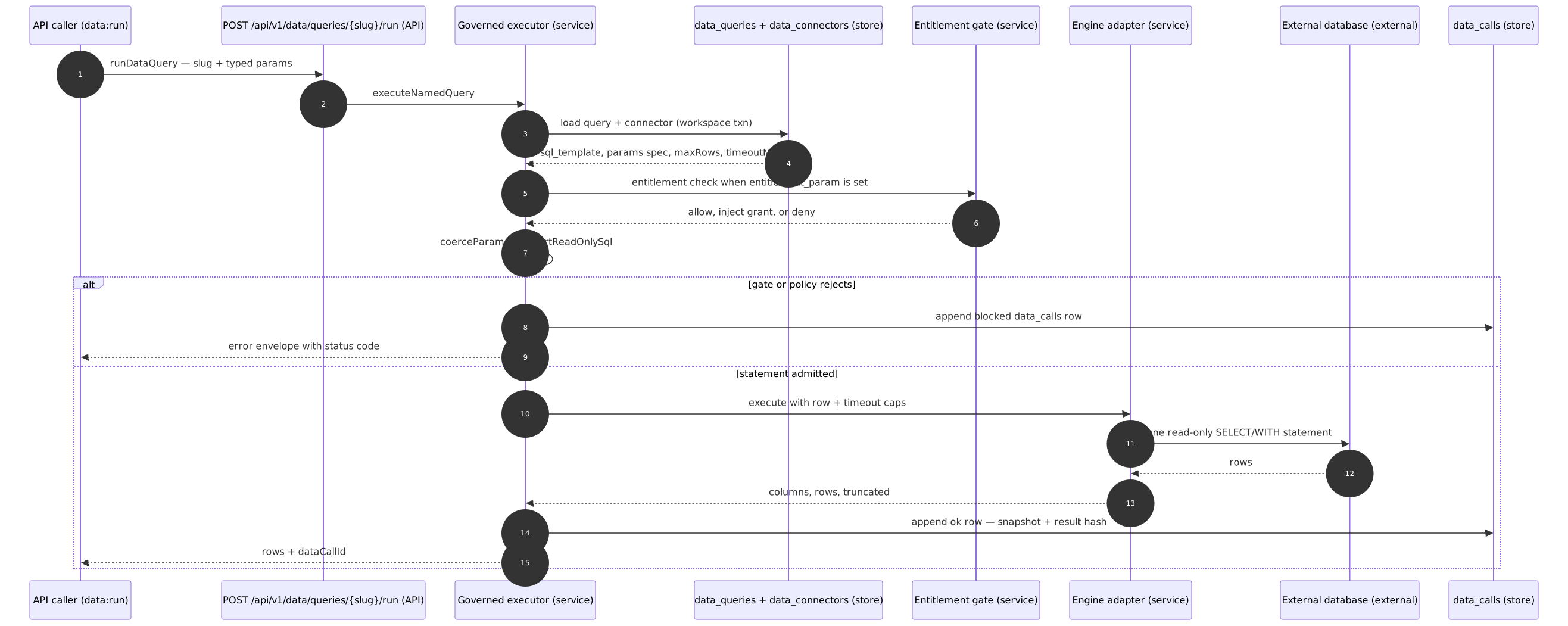
The highest-value path is runDataQuery: one governed execution from slug and params to rows and a provenance anchor. The same tail — gate, caps, provenance — runs identically when the caller is the MCP lookup tool or the structured-answer data bridge.
Conduit — primary runtime flow
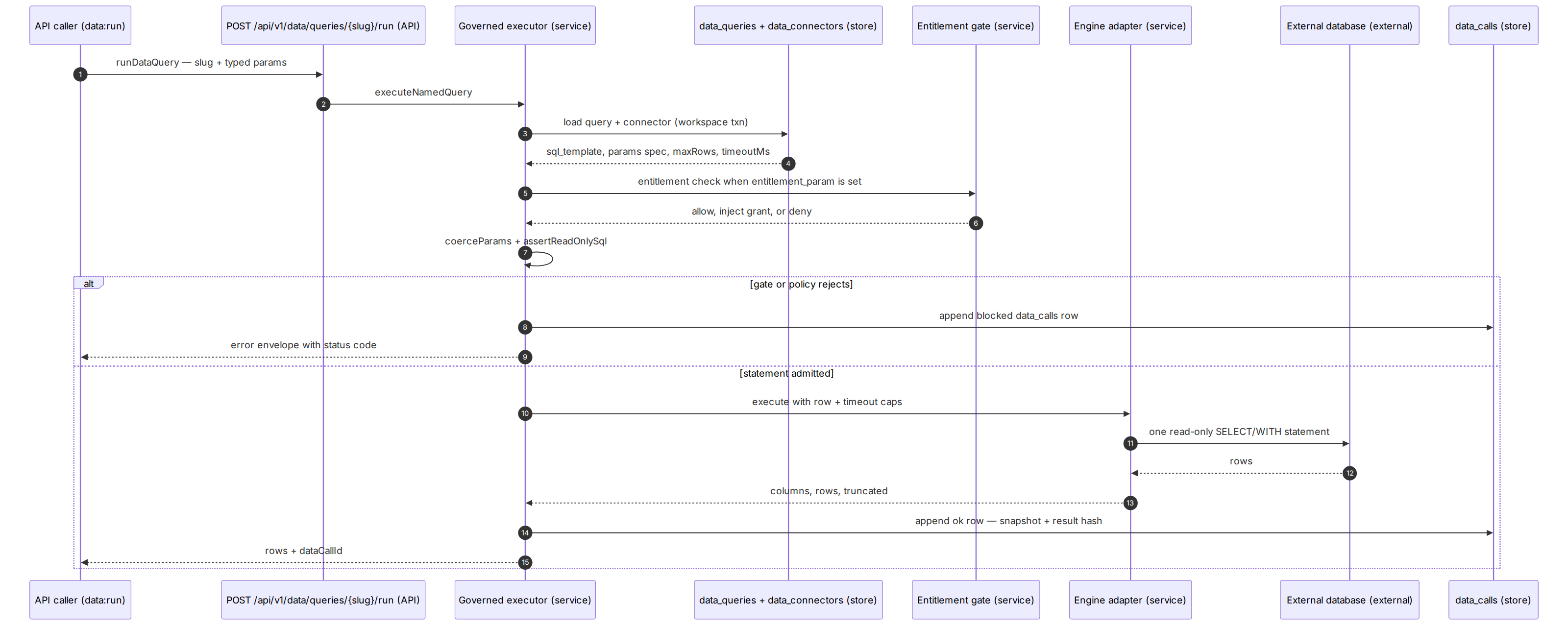
One runDataQuery execution. Catalog reads run in a short workspace transaction, the external call happens outside any transaction, and a data_calls row is appended on every outcome — the response's dataCallId is that row's id.
Downloads
Concepts
- Primary runtime flow
- Modules
- Conduit
Keywords
- API caller (data:run)
- POST {slug}/run (API)
- data_calls (store)
- data_queries + data_connectors (store)
- sql_template, params spec, maxRows, timeoutMs
- entitlement check when entitlement_param is set
- append blocked data_calls row
- one read-only statement
- rows + dataCallId
- Governed executor (service)
- Entitlement gate (service)
- Engine adapter (service)
- External database (external)
- runDataQuery — slug + typed params
- load query + connector (workspace txn)
- allow, inject grant, or deny
- coerceParams + assertReadOnlySql
- error envelope with status code
- execute with row + timeout caps
- columns, rows, truncated
- append ok row — snapshot + result hash
- /api/v1/data/queries
- executeNamedQuery
- rows
Source and generation provenance
Status: current
Generated at: 2026-08-17T18:31:55.945Z
Source hash: 34e5775d30aa8c6e1465a4ae31a938432cde35e42a4a13df238bdd067d26d49d
Metadata payload hash: 49266b5fc2d038160133de1a0ef2cb26bb5f9572414d492584a97be43d99afc3
Canonical appearance
src/app/(docs)/docs/modules/conduit/page.tsx:107 route /docs/modules/conduit
All appearances
canonical—src/app/(docs)/docs/modules/conduit/page.tsx:107route/docs/modules/conduit
No mirrored appearances.
Generation versions
App: eli-ai 0.1.0
Mermaid: 11.16.0 · Mermaid CLI: 11.16.0
Node: v26.3.1 · Yarn: 4.17.1
Renderer config hash: 68c10966fe84406ee626034d58bfabd555df9f65f691204b7c46db24038da101
Renderer theme hash: c80287a78d80ad63d27bd5ca348b2ef9a7e2f44da289e436be6484ea28a1b033
Adapter versions: diagramGenerator=2, drawioFlowchart=1, drawioGantt=1, drawioSequence=1, drawioState=1
Full sidecar JSON: conduit-primary-runtime-flow-34e5775d.json
How to read the run flow
- Resolve before executing: The executor loads the query and its connector inside a workspace transaction and refuses disabled rows before touching parameters.
- Gate in layers: The entitlement gate resolves the principal's grants, then parameters coerce against the typed spec, then the statement passes the static read-only check.
- Execute under caps: The engine adapter wraps the statement with the row cap and the engine's timeout mechanism; the credential decrypts only for the duration of the call.
- Record either way: Success appends an ok row with a bounded snapshot and full-set hash; a refusal or failure appends a blocked, error, or timeout row first, then surfaces the error.
- Trust boundary
- Callers choose a slug and supply values; the statement itself, the caps, and the provenance write are server-owned and not caller-configurable.
- Durable state
- Every attempt lands in data_calls with the exact executed statement, the params used, and the outcome — the anchor a [Dn] citation resolves to.
Failure paths
- Required param missing or uncoercible returns 400 invalid-params
- Entitlement denial records a blocked row and returns 403
- Engine error maps to 502 execution-failed with an error row
- Timeout past timeoutMs maps to 504 with a timeout row
Signals
- Ratio of ok rows to blocked and error rows
- durationMs distribution per connector
- Rows-truncated frequency per query
- Entitlement denials per user and parameter
Internals and invariants
Connector registry
A connector row is the unit of trust: engine kind, non-secret config, an encrypted credential, the row and timeout caps, and an optional discovered schema snapshot. The catalog service owns writes and always masks reads; adapters own engine specifics behind one shared interface, so the executor stays engine-agnostic.
- Invariant — connector credentials never leave the server: they encrypt at write time and every read path substitutes the hasCredential boolean, with decryption confined to call time. Enforced in
src/server/data/connectors.tsandsrc/server/data/executor.ts. - Invariant — an adapter cannot widen the gate: statement policy, parameter coercion, caps, and provenance all run above the adapter layer, which receives already-validated SQL and values. Enforced by the registry in
src/server/data/adapters.
Named queries with typed params
A named query binds a single-statement template to an ordered, typed parameter spec: params[0] feeds $1, and so on. Save time validates that every placeholder has a spec; run time coerces caller values to the declared types, applies defaults, rejects missing required values, and silently drops unknown keys.
- Invariant — a template placeholder without a matching parameter spec cannot be saved, so an executable query always has a complete typed signature. Enforced by validateTemplateParams in
src/server/data/executor.ts.
Read-only execution policy
The policy is layered. A static check strips literals and comments, then requires exactly one statement beginning with SELECT or WITH and free of data-modifying, DDL, and session keywords — which is what rejects writing CTEs and SELECT INTO. Below it, each adapter adds what its engine offers: read-only transactions or sessions where they exist, and the engine's statement timeout everywhere.
- Invariant — no statement reaches an engine without passing the static read-only gate in the same process, and a rejection is itself recorded as a blocked provenance row. Enforced by assertReadOnlySql in
src/server/data/executor.ts.
Entity bindings
A binding attaches one named query to exactly one entity or one entity type, with a param map whose sources are the entity's name, a stored constant, or a model-supplied value. Resolution for an entity returns its direct bindings plus the ones inherited from its type; the structured pipeline executes only bindings whose params resolve without a model source.
- Invariant — a binding targets exactly one of entityId or entityType, never both and never neither. Enforced by createBinding in
src/server/data/bindings.ts.
Per-user entitlements
A query whose entitlement parameter is set is client-scoped: execution requires a user principal holding a matching grant, a single grant is injected automatically when the value is omitted, and any value outside the grant set is refused. Workspace service keys and system machinery are the two named bypasses — an absent principal is never silently equivalent to either.
- Invariant — entitlement-scoped execution fails closed, and every denial is recorded as a blocked provenance row so refusals are as auditable as executions. Enforced inside
src/server/data/executor.ts, with grants administered insrc/server/data/entitlements.ts.
Provenance and [Dn] citations
Every attempt appends one row: the exact executed statement, the params used, the outcome status, and timing. Successful calls additionally freeze a bounded sample of the returned rows plus a hash over the full normalized row set, so a figure cited in a produced artifact stays provable after the live data moves on. The structured pipeline reads these rows back to enrich each [Dn] with a connector name and execution timestamp.
- Invariant — one execution attempt, one append-only data_calls row, on every path and every outcome; there is no update or delete path. Enforced by the provenance recorder in
src/server/data/executor.tsand consumed bysrc/server/query/data-bridge.ts.
For a self-hosting team the safe extension points are the edges, not the gate: contribute an additional engine through a plugin data adapter (the read-only policy, coercion, caps, and provenance stay host-owned), build your own surface on the headless data client instead of EliLiveData, and subscribe to the module's published events for downstream automation. The executor's policy layers and the append-only provenance contract are the parts everything else assumes and are not designed to be replaced.
How it composes
Conduit runs entirely on its own for the slug-and-params use case. What the other modules add is binding — the ability to go from a thing in the graph to the live numbers about it without a caller knowing which query to run.
With Atlas — bindings become available
entity_bindings resolves against entity rows: a binding matches either the entity's id or its type, and a lookup for one entity returns its direct bindings plus the ones inherited from its type. Without Atlas there are no entities to bind to, so the binding table stays empty and the param_map source entity_name has nothing to resolve. Everything in the three v1 routes still works unchanged — those never touch bindings.
With Lens — live rows join the cited answer
POST /api/v1/query takes an includeData boolean. When true, the pipeline resolves bindings for the entities it detected in the question, executes those whose params fully resolve without a model source, and returns them as dataCalls — each entry carrying id · dataCallId · connectorName · queryTitle · rowCount · executedAt. It is capped at three data calls per answer, a per-binding failure never blocks the document-grounded answer, and that route gates on agents:run and needs a configured chat model — both things Conduit alone does not. See Lens.
With Warrant — data evidence can overturn an abstain
In the same pipeline, a retrieval-floor verdict of abstain_with_pointers is overridden to proceed when live data actually ran, and the override is recorded on the decision. That is a Warrant policy behaviour reacting to Conduit evidence; it does not exist if you use Conduit by itself.
With Ports — two MCP tools
The MCP server exposes kb_data_discover (accepts data:read or data:run) to list the bindings that apply to a named entity along with the params the caller still has to supply, and kb_data_lookup (requires data:run) to execute one, selected by bindingId or bindingLabel. Omitting both works only when exactly one binding applies. Both mirror the REST scope map rather than bypassing it, and the lookup returns the same eight fields as the run endpoint. See Ports.
With Lineage — the [Dn] trail
data_calls is the provenance substrate a Lineage trace follows for a live figure, the way a document chunk backs an [Sn] citation. Conduit writes those rows unconditionally, so the trail exists whether or not you have adopted the module that reads it.
The honest standalone boundary
Extending Conduit
dataAdapters — resolved synchronously and shape-checked before the executor will use it, with the read-only SQL gate, parameter coercion and row caps staying host-owned. Plugins can also execute governed queries through the facade: ctx.data.conduit.runNamedQuery(slug, params) requires data:execute and appends the same data_calls provenance row any other caller would, so a plugin-driven figure is as citable as a human-driven one. Conduit emits data.call.completed and data.query.saved. See the extension model for the contract and the trust boundary, and Build a plugin for a worked example.